


Review Of My New Wireless Mouse & Keyboard


Thread Starter
Administrator

Joined: Oct 2002
Posts: 13,943
Likes: 0
From: ɯooɹpǝq ɹnoʎ
Vehicle: ǝdnoɔ sısǝuǝƃ

I just bought this as a bundle from Best Buy. It was $49 and I had to grab it, it's awesome!
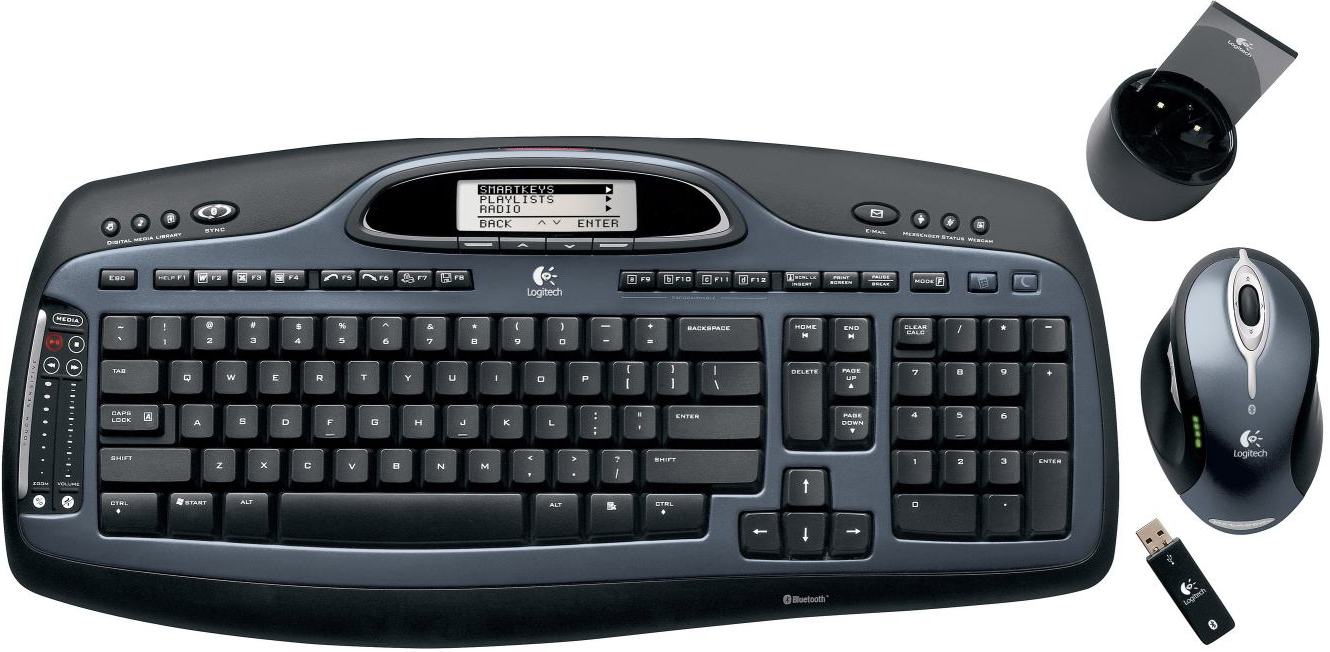
Logitech Keyboard: MX 5000
Logitech Mouse: MX 1000
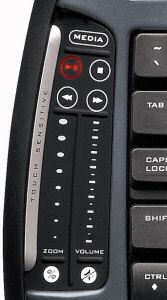
Both are Bluetooth and have good range. The keyboard has really nice button features (zoom and volume control touch sensitive range). The LCD display shows date, time, and temperature... very nice and easy to use. The wireless connection is via Bluetooth. I type fast (over 100 WPM, most I've tested on was 121 WPM) and it keeps up perfect. The ONLY complaint I have is the DELETE key. It's not the typical Delete, Insert, Home, End, Page Up, Page Down group. It bothered me at first, but hasn't since. I actually use those keys, as I use mostly keyboard shortcuts for everything I can. You can see in the pics below what I mean...
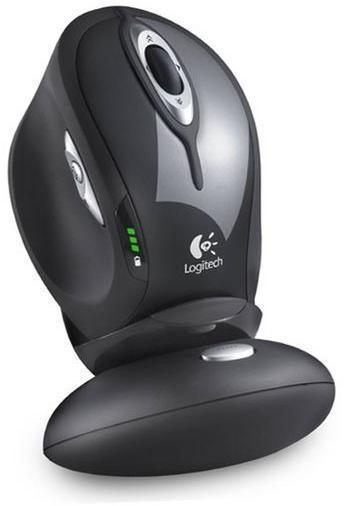
The mouse is bluetooth as well, and is LASER rather than Optical. Works great, has great number of buttons. The scroll on the mouse acts as a button, and not only goes back and forth, but you can tap it right or left with your finger to scroll sideways. There is a small button on the side by the thumb, three buttons actually, and they're very handy for navigating webpages. One goes back, the other forward, and the center button (on vista) goes to the window selection screen (same as hitting Windows Key + TAB).
Of course, the Logitech software allows you to change, modify, disable any or all of these buttons. I love it... absolutely love it... and for $50 I can't complain one bit!!!
Oh, and the mouse is Rechargeable! AND has a battery indicator light on the side. No mouse batteries FTW!
This is the actual bundle I got. The bottom pic is similar, but different mouse dock and mouse colors.

Logitech Keyboard: MX 5000
Logitech Mouse: MX 1000
Both are Bluetooth and have good range. The keyboard has really nice button features (zoom and volume control touch sensitive range). The LCD display shows date, time, and temperature... very nice and easy to use. The wireless connection is via Bluetooth. I type fast (over 100 WPM, most I've tested on was 121 WPM) and it keeps up perfect. The ONLY complaint I have is the DELETE key. It's not the typical Delete, Insert, Home, End, Page Up, Page Down group. It bothered me at first, but hasn't since. I actually use those keys, as I use mostly keyboard shortcuts for everything I can. You can see in the pics below what I mean...
The mouse is bluetooth as well, and is LASER rather than Optical. Works great, has great number of buttons. The scroll on the mouse acts as a button, and not only goes back and forth, but you can tap it right or left with your finger to scroll sideways. There is a small button on the side by the thumb, three buttons actually, and they're very handy for navigating webpages. One goes back, the other forward, and the center button (on vista) goes to the window selection screen (same as hitting Windows Key + TAB).
Of course, the Logitech software allows you to change, modify, disable any or all of these buttons. I love it... absolutely love it... and for $50 I can't complain one bit!!!
Oh, and the mouse is Rechargeable! AND has a battery indicator light on the side. No mouse batteries FTW!
This is the actual bundle I got. The bottom pic is similar, but different mouse dock and mouse colors.

Senior Member
Joined: Mar 2006
Posts: 9,172
Likes: 0
Vehicle: 2001/Hyundai/Tiburon
should have gotten this puppy...
http://www.logitech.com/index.cfm/keyboard...81&cl=us,en
i can't even use mice without this sweet free spin function on this mouse.
http://www.logitech.com/index.cfm/keyboard...81&cl=us,en
i can't even use mice without this sweet free spin function on this mouse.

Senior Member
Joined: Mar 2006
Posts: 9,172
Likes: 0
Vehicle: 2001/Hyundai/Tiburon
98% same keyboard...
http://search.ebay.com/mx-3200_W0QQcatrefZ...ZQ2d1QQsbrsrtZd
and 100% same mouse...
http://search.ebay.com/search/search.dll?s...ntrypage=search
both can be had for 70 combined pretty easily, and this mouse is definitely worth it. i can go all the way down when looking at long threads and with a flick of a finger be right back at the top. then you think about if you work with excel or something similar and have like thousands of rows of data. super easy to navigate through them.
not knocking his deal, just providing an alternative.
http://search.ebay.com/mx-3200_W0QQcatrefZ...ZQ2d1QQsbrsrtZd
and 100% same mouse...
http://search.ebay.com/search/search.dll?s...ntrypage=search
both can be had for 70 combined pretty easily, and this mouse is definitely worth it. i can go all the way down when looking at long threads and with a flick of a finger be right back at the top. then you think about if you work with excel or something similar and have like thousands of rows of data. super easy to navigate through them.
not knocking his deal, just providing an alternative.

Moderator

Joined: Mar 2009
Posts: 5,280
Likes: 0
From: wamego, kansas
Vehicle: 2001 hyundai tiburon
I wish they would come out with a rechargeable trackball. i switched over to trackballs roughly 10 years ago and will never look back.
logitech makes some great stuff.
logitech makes some great stuff.

Senior Member

Joined: Apr 2008
Posts: 2,087
Likes: 0
From: Western PA
Vehicle: 2001 Tiburon
my boss has that same mouse and keyboard sitting on his desk... he likes it. I was never a fan of wireless when you can go wired like on a desk. but for 50 bucks you cant beat that deal.

Senior Member
Joined: Mar 2006
Posts: 4,244
Likes: 0
From: Ashland, KY
Vehicle: 2001/Hyundai/Tiburon
I have nicer stuff at home for gaming but here at work I've got the cheap logitech stuff. I however CAN'T stand the el cheapo no name brand stuff from office max and others. Why would you put yourself through that.
Anyways looks nice majik. I'm not a big fan of wireless at the desk just because I would hate changing the batteries. Logitech is by far my favorite brand of input devices. Nearly all my computers have logitech boards, mice, and even my gaming stuff is logitech.
Anyways looks nice majik. I'm not a big fan of wireless at the desk just because I would hate changing the batteries. Logitech is by far my favorite brand of input devices. Nearly all my computers have logitech boards, mice, and even my gaming stuff is logitech.

Moderator
Joined: May 2001
Posts: 7,166
Likes: 6
From: San Antonio, TEXAS!!!
Vehicle: 01 Tiburon Turbo, 99 Tiburon F2E, 2013 Avalon XLE Touring
Yea, I got that same MX5000 combo about a year ago, when it was $150. But my girlfriend gets a huge discount from Bestbuy, so it was about what you paid. I thought I made a post about it.
Anyways, the keyboard eats the shit out of batteries. Try to turn it off every once in a while if you're not going to use it for a day or so. It's a hassle, but it'll save you from changing them out all the time.
Sometimes the keyboard meter is a little quirky too. I'll change out the batteries, but the meter doesn't reset and says they're "critical" in the menu.
But the good by far outways the quirks of it. I LOVE the touch buttons, media quickstart buttons, and the calculator.
Anyways, the keyboard eats the shit out of batteries. Try to turn it off every once in a while if you're not going to use it for a day or so. It's a hassle, but it'll save you from changing them out all the time.
Sometimes the keyboard meter is a little quirky too. I'll change out the batteries, but the meter doesn't reset and says they're "critical" in the menu.
But the good by far outways the quirks of it. I LOVE the touch buttons, media quickstart buttons, and the calculator.
Thread Starter
Administrator
Joined: Oct 2002
Posts: 13,943
Likes: 0
From: ɯooɹpǝq ɹnoʎ
Vehicle: ǝdnoɔ sısǝuǝƃ
I use the computer maybe 2-3 hours a day, so I can always turn the keyboard off if I remember, thanks for the advanced notice. The mouse has no batteries which is my favorite part. I don't really like the quick scrolls... never had a use for them personally.
I'm happy.
I'm happy.